
Graceful degradation is a design approach that ensures the core functions of a website continue to work even when individual parts of it stop functioning. This method removes single points of failure: just because one thing stops working does not mean the whole system breaks. A website built according to this principle fails in parts rather than all at once, so the most important functions remain accessible when some components encounter an error.
The idea or concept of a single point of failure is well known in manufacturing. It is one of the most common resilience strategies in manufacturing and supply chain operations. A factory with multiple material sources can continue working even when one supplier becomes unavailable. However, this is becoming increasingly important in web development as user expectations for accessibility and functionality grow.
Data centre redundancy is a common example of graceful degradation in web development. By using multiple server components, websites ensure they keep working even if one or more servers fail. In a design context, this can look like making sure that a lack of support for a particular feature in a user’s browser or device does not make the app unusable.

Escalators are a familiar real-world example of the same principle. When they stop working, they can still move people from one floor to another by functioning as stairs. They may not be as functional as usual, but they are not completely useless.

The BBC News webpage is a good example of graceful degradation in web design. As shown in this screenshot, the site prioritises loading navigation elements and news text over images. As a result, images may be unavailable on a slow internet connection or when using old, incompatible browser plugins, but the site’s core function — sharing news — remains available.
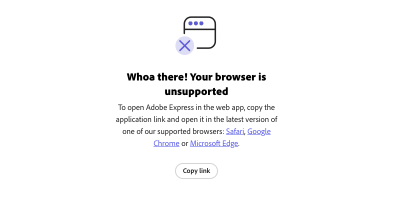
By contrast, the Adobe Express website is an example of what happens without graceful degradation. Instead of making some features unavailable or slowing down loading times, the entire website is inaccessible in some browsers. This means users have to update or change their software to use the web app, which is not good from an accessibility perspective.
Graceful degradation vs. progressive enhancement
The graceful degradation approach works as the opposite of progressive enhancement — a method where the designer creates the foundation of a website and gradually adds features that are enabled only if the browser can run them. Each feature layer is disabled by default, allowing for a consistent user experience designed to work for everyone.
There is a lot of debate among designers about whether graceful degradation or progressive enhancement is the best way to build website functionality. In reality, however, both are important. Each method has unique advantages and disadvantages, so they can complement one another to provide the greatest resilience.
Progressive enhancement is a good strategy when creating a new website or app, because you ensure a working experience for everyone from the start. However, new standards and issues may emerge later, and that is where graceful degradation becomes useful. This approach helps adapt an existing website so it meets new accessibility standards or solves a compatibility issue you had not noticed before.
Focusing only on one design principle or the other will limit accessibility. Progressive enhancement alone struggles to account for functionality problems after launch, while graceful degradation alone may not provide the richest baseline experience. Combining both methods gives the best result.
How does graceful degradation affect accessibility?
Ensuring that your website or app remains functional is critical for accessibility. When core functions become unavailable, the platform is no longer accessible to anyone. On a smaller scale, if features such as text-to-speech readers or video captions stop working, users with visual difficulties may be unable to use the website.
The accessibility impact of graceful degradation is even greater when considering different device capabilities. Since the average person spends 3.6 hours per day on their phone, failing to ensure that a website supports less powerful mobile browsers will exclude a large part of your audience. Even if some complex features do not work on mobile, sacrificing them to keep most of the website accessible on phones ensures broader access.
Outdated browsers are another common accessibility issue that you can solve by applying graceful degradation. Consider this Fairleigh Dickinson University example about Adobe Flash, which most modern browsers no longer support.

Software that still uses Flash cannot use the multi-factor authentication feature mentioned above. As a result, users with older programs cannot log in. Graceful degradation could offer a compromise by making some features unavailable to Flash-supporting browsers while still allowing general access. This way, people would not need to upgrade in order to use the service.
How can you integrate graceful degradation into your website?
Graceful degradation removes technological barriers to accessibility. Broadly speaking, it also ensures that your website or app always works, even during unexpected technical difficulties. Although there are many ways to achieve this, here are some general best practices to follow.
Identify mission-critical functions
The first step in ensuring graceful degradation is identifying your core functions. You can guarantee access to mission-critical functions only when you know what is essential and what is not.
Review your user data to see what your audience interacts with most — these are usually the elements worth prioritising. Anything related to site security, transactions, and readability is also highly important. Rarely used features or elements such as video players and interactive maps are nice to have, but they can be sacrificed if necessary to ensure that critical components remain accessible.
Create redundancy
Once you have ranked your site’s features by importance, you can ensure redundancy for the most important ones. This may mean replicating elements in multiple forms so they work across different browsers or devices. Alternatively, you can provide multiple services to perform important functions, such as supporting alternative payment methods or offering both video and text versions of content.
Remember that redundancy also applies to the hardware that runs your platform. The Uptime Institute classifies data centres into tiers that you can use to determine what redundant systems you need. Also make sure you can run your website across multiple servers to avoid failure if one of them stops working.
Adapt for all browsers
Remember that graceful degradation also means supporting software and hardware with different capabilities. One of the most important aspects of web design is adapting for outdated browsers.
Although mobile devices do not support Flash, some older desktop browser versions still use it. You can work with both by avoiding Flash — HTML5 can often be used instead — but without requiring users to have a browser that does not support Flash. You can also offer low-bandwidth, simple alternatives to any features that require heavy processing power, keeping everything accessible on older systems.

Do not forget to pay attention to security settings in newer software as well. Error messages like this one, which a Microsoft user posted about, can appear if a website does not support some updated browser security protocols. Always keep track of updates to popular platforms such as Chrome and Safari so you meet these standards and avoid access issues like this.
Use load balancing and caching
Load balancing is another important step in graceful degradation. Many cloud services automatically distribute traffic across server resources to avoid overload. Enabling this also ensures that requests can be handled by another part of the system if one part fails.
Caching works in a similar way. By storing critical data, you create a backup plan if an external service or application programming interface (API) is down. When an API does not respond, you can load stored data instead. As a result, caching significantly reduces latency in many cases, but you should know that you cannot cache everything. Focus on the most important functions.
Test before publishing
Finally, before launching a website, make sure to test it for accessibility issues. Access it from several devices, including different browser versions. See whether you can run it on a single server to test its ability to balance loads.
You probably will not catch every possible error during testing, but catching some is better than catching none. Do not forget to test your site’s functionality before any updates or redesigns as well.
How can you start applying graceful degradation?
Designers, both large and small, can begin their graceful degradation journey by changing some settings in their hosting provider environment. AWS offers guidance on failure management that you can use to build degradation into your site architecture. Hosting providers should also allow you to upgrade your storage plan and configure server settings to ensure redundancy and load balancing.
Companies large enough to manage their own data centres should implement redundant server capacity and uninterruptible power supplies to keep everything running. Smaller organisations can rely on their code, using semantic HTML so it is simple enough for multiple browsers. Programming non-essential elements such as images and videos to stop working when bandwidth is low will also help.
Virtualisation systems such as Kubernetes are also useful as a way to scale site capacity and help load elements independently from one another in order to preserve accessibility. Testing tools such as BrowserStack, WAVE, and CSS HTML Validator can help you by revealing whether your site has functional issues in certain browsers or for certain users.
At its core, web accessibility is about ensuring that a platform works as intended for all people. Although design features may be the most obvious part of this goal, technical safeguards also play an important role. A website is accessible only when it works, so you must preserve its functionality even when unexpected disruptions occur.
Graceful degradation is not a perfect solution, but it prevents a small problem from becoming a larger one. By following these five steps to implement it on your website or app, you ensure that your work on accessible design does not go to waste.



.webp)
.webp)
.webp)
.webp)
.webp)