Children start interacting with the internet when they are 3–5 years old. How do you design for children? What should we keep in mind when doing so? And how do we meet the expectations of the most demanding users you can find — parents? Well, let’s find out.
Encourage play and small wins
Designing for children is hard. Children tend to lose focus and motivation. They give up when they get bored, and they move on to something else if they cannot quickly achieve a result. They need constant achievements. So, as designers, we need to value, reward, and encourage small wins to build habits and support learning — through progress tracking and gamification.
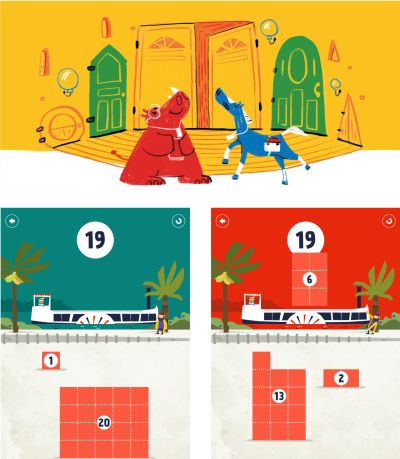
As Deb Gelman, author of Design for Kids, discovered, children say a lot about themselves through how they play, what they choose to play, how long they play with it, and when they decide to play with something else. However, they do not get too frustrated when something does not work. They simply choose to browse or play something else.
Most importantly, we cannot design for children without testing. Even better: involve children in co-creating their digital experiences and involve parents in creating reliable safety mechanisms. With a fun, smart, and safe product, parents will spread the word about you faster than you ever could yourself.
Always target a two-year age range
As designers, we should always remember that “children” represent a very broad range of behaviors and abilities. There are huge differences between age groups — 3–5, 6–8, and 9–12 years old — both in how users navigate and in how we communicate with them.
In general, when designing for children, target a two-year age range, no more. These days, children start interacting with the internet at 3–5 years old. The first interactions they learn are swiping, scrolling, controlling videos, and the Home button.
How do you convince parents?
Whenever you design for children, you are always designing for parents as well. In fact, parents are the most demanding users you can find. They are absolutely ruthless in their feedback, requests, complaints, and app store ratings.
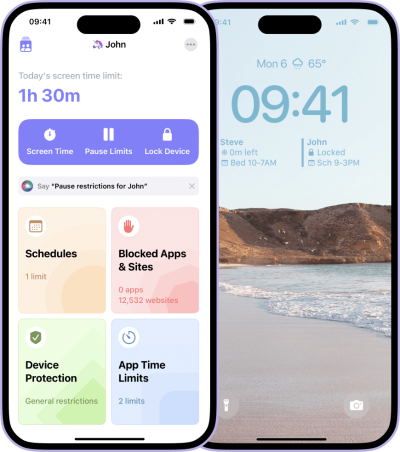
This is not surprising. Parents need safety guarantees, rules, and certifications — some kind of assurance that you take their safety and privacy seriously, especially when it comes to third-party integrations or advertising. In fact, they are often willing to pay more for apps just to avoid ads.
Parents often value reviews from teachers, educators, doctors, and other parents. And they need parental control features so they can set specific time limits, rules, access, and permissions.
As Rodrigo Seoane highlighted in an email, an important concern to keep in mind is “how most initiatives for children rely on and create dependencies on external motivations. The reward model keeps their attention in the short term, but as the main gamified mechanic, it is problematic in the long run, reducing their cognitive abilities and creating a barrier to developing any intrinsic motivation.” So, whenever possible, design to increase intrinsic motivation.
Guidelines for child-friendly design
- Use large text — 18–19 pixels — with large touch targets, minimum 75×75 pixels.
- Use fonts that resemble how children learn to write.
- Translate text into engaging visuals, icons, sounds, and characters.
- Avoid buttons at the bottom, because children constantly tap them by mistake.
- Children expect feedback after every action they perform.
- Do not be patronizing: show age-appropriate content for the age group you are designing for.
- Be transparent: children cannot distinguish ads or promotions from real content.
- You are always designing for both children and parents.
- Parents are the most demanding users. They are ruthless in feedback and ratings.
- Create parental control features for time limits, rules, and access.
- Instead of external rewards, design to increase intrinsic motivation.
Useful resources
- “8 Things to Consider When Designing for Children”, Jasmine Bilham
- “Design Considerations for Little Fingers”, Andrew Smyk
- “How to Create a Product Children Will Love”, Mariia Kasym
- “Designing for Children” — a 7-part series, Catalina Naranjo-Bock, Jonathan Evans, Paul Osborne
- “Children’s UX: Usability Issues in Designing for Young People”, Katie Sherwin, Jakob Nielsen
- “Usability Testing with Children”, Alita Joyce
- “Designing Web Interfaces for Kids”, Trine Falbe
- “Designing Apps for Young Kids” — behind the Medium paywall, Rubens Cantuni
- “Designing for Children” — PDF guidelines, Gerry Gaffney, James Hunter
- “The Ultimate Guide to Designing Apps for Kids”, Tanya Junell
Useful resources for designing for children
Digital toolkits for children
- UX Research Toolkit for Playtesting with Kids — UX methods
- Designing with Children — workshops and case studies
- Co-Design with Kids Toolkit
- Playful Design Toolkit
- DeCID Handbook for Displaced Children
- Designing for Children’s Rights Guide
Books and ebooks
- Designing For Motivation (Pocket Guide), Anamaria Dorgo, LxD Lab
- Designing Digital Products For Kids, Rubens Cantuni
- Design For Kids, Deb Gelman
- Designing Spaces For Children, Nathalie Dziobek-Bepler


.webp)
.webp)
.webp)
.webp)
.webp)