
In the article “A Week In The Life Of An AI-Augmented Designer,” Kate stumbled through an AI-augmented sprint — much coffee was consumed, many mistakes were made. In “Prompting Is A Design Act,” we introduced WIRE+FRAME, a framework for structuring prompts the way designers structure creative briefs. Now we will take the next step: packaging those structured prompts into AI assistants that you can build, reuse, and share.
AI assistants go by different names: “CustomGPTs” in ChatGPT, “Agents” in Copilot, and “Gems” in Gemini. But they all serve the same purpose: allowing you to adapt a default AI model to your unique needs. If we continue with our smart intern analogy, think of them as interns trained to help you with specific tasks, removing the need to repeat instructions or information, and able to support not only you but your whole team.
Why build your own assistant?
If you have ever copied and pasted the same mega-prompt for the nth time, you have felt this pain. An AI assistant turns a one-off “great prompt” into a reliable team member. And if you have used any publicly available AI assistants, you have probably quickly realized that they are usually generic and not tailored to your use case.
Public AI assistants are great for inspiration, but nothing beats an assistant that solves a recurring problem for you and your team, in your style, with your context and constraints. Instead of reinventing the wheel by writing new prompts each time, constantly copying and pasting structured prompts, or wasting time trying to make a public AI assistant behave the way you need it to, your own AI assistant makes it easier for you and others to get better, repeatable, consistent results faster.
The benefits of reusing prompts — even your own
Some of the benefits of building an AI assistant instead of writing or reusing your own prompts include:
- Focused on a real recurring problem. A good AI assistant is not a general-purpose “do everything” bot that you constantly need to refine. It focuses on one recurring problem that takes a long time to do manually and whose output quality often varies depending on who does it, such as analyzing customer feedback.
- Tailored to your context. Most large language models — LLMs, such as ChatGPT — are designed to be everything to everyone. An AI assistant changes that by letting you adapt it so it automatically works the way you want it to, rather than like a generic AI.
- Consistency at scale. You can use the WIRE+FRAME prompting framework to create structured, reusable prompts. An AI assistant is the next logical step: instead of copying and pasting that carefully tuned prompt and sharing contextual information and examples each time, you can bake it into the assistant itself, allowing you and others to achieve the same consistent results every time.
- Codifying expertise. Every time you turn a great prompt into an AI assistant, you are essentially bottling your expertise. Your assistant becomes a living design guide that lasts beyond projects — and even job changes.
- Faster onboarding for team members. Instead of starting from a blank page, new designers can use pre-tuned assistants. Think of it as knowledge transfer without a long onboarding lecture.
Reasons to build your own AI assistant instead of using public ones
Public AI assistants are like standard templates. While they serve a specific purpose compared with a generic AI platform and are useful starting points, if you want something tailored to your and your team’s needs, you should really build your own.
A few reasons to build your own AI assistant instead of using a public one created by someone else:
- Fit: Public assistants are built for the masses. Your work has nuances, tone, and processes that they will never match exactly.
- Trust and safety: You do not control what instructions or hidden constraints someone else has embedded. With your own assistant, you know exactly what it will do — and what it will not.
- Evolution: The AI assistant you design and build can grow with your team. You can update files, refine prompts, and maintain a changelog — things a public bot will not do for you.
Your own AI assistants allow you to take successful ways of interacting with AI and make them repeatable and shareable. And while they are tailored to the way you and your team work, remember that they are still based on generic AI models, so the usual AI warnings apply:
Do not share anything you would not want to see in a screenshot at your next company all-hands meeting. Follow security, privacy, and user-respect practices. A shared AI assistant can potentially reveal its internal instructions or data.
Note: We will build an AI assistant using ChatGPT, meaning a CustomGPT, but you can try the same process with any decent LLM assistant. At the time of publication, creating a CustomGPT requires a paid account, but once created they can be shared and used by everyone, whether they have a paid or free account. Similar restrictions apply to other platforms. Just remember that results may vary depending on the LLM model used, the model’s training, mood, and tendency toward creative hallucinations.
When should you not build an AI assistant — yet?
An AI assistant is great when the same audience often faces the same problem. When that fit is missing, the risk is high; for now, you should skip building an AI assistant, as explained below:
- One-off or rare tasks. If it will not be used at least monthly, we would recommend keeping it as a saved WIRE+FRAME prompt. For example, something for a one-time audit or temporary content creation for a specific screen.
- Sensitive or regulated data. If you need to include personally identifiable information, health, financial, legal data, or trade secrets, you should avoid building an AI assistant. Even if the AI platform promises not to use your data, we strongly suggest using redaction or an approved enterprise tool with the necessary safeguards, such as company-approved Microsoft Copilot versions.
- Complex process control or logic. Multi-step workflows, API calls, database writes, and approvals go beyond the limits of an AI assistant and enter “Agent” territory — at least for now. We recommend not trying to build an AI assistant for these cases.
- Real-time information. AI assistants may not have access to real-time data such as prices, live metrics, or the latest news. If you need that, you can upload near-real-time data, as we do below, or connect to data sources controlled by you or your company instead of relying on the open internet.
- High-stakes outputs. For cases involving compliance, law, medicine, or any other field requiring auditability, consider implementing process safeguards and training so humans remain involved for proper review and accountability.
- No measurable benefit. If you cannot name a success metric, such as time saved, first-draft quality, or fewer reworks, we recommend keeping it as a saved WIRE+FRAME prompt.
Just because these signs suggest that you should not build your own AI assistant now does not mean you should never do it. Revisit the decision when you notice that you are reusing the same prompt weekly, several team members ask for it, or the manual copy-paste-and-refine time starts exceeding about 15 minutes. Those are signs that an AI assistant will quickly pay off.
In short, build an AI assistant when you can name the problem, audience, frequency, and benefit. The rest of this article shows how to turn a successful WIRE+FRAME prompt into a CustomGPT that you and your team will actually be able to use. No advanced knowledge, coding skills, or hacks required.
As always, start with the user
For UX professionals this should go without saying, but it is worth repeating: if you are building an AI assistant for someone other than yourself, start with the user and their needs before you build anything.
- Who will use this assistant?
- What specific problem or task is difficult for them today?
- What language, tone, and examples will feel natural to them?
Building without doing this first is a reliable way to create clever assistants that nobody actually wants to use. Think of it like any other product: before you build features, you understand your audience. The same rule applies here, even more so, because AI assistants are only as useful as they are usable.
From prompt to assistant
You have already done the hardest work with WIRE+FRAME. Now you are simply turning that refined and reliable prompt into a CustomGPT that you can reuse and share. You can use MATCH as a checklist to move from a great prompt to a useful AI assistant.
- M — Map your prompt. Move your successful WIRE+FRAME prompt into the AI assistant.
- A — Add knowledge and training. Ground the assistant in your world. Upload knowledge files, examples, or guides that make it uniquely yours.
- T — Tailor it to the audience. Make it feel natural to the people who will use it. Give it the right capabilities, but also adjust its settings, tone, examples, and conversation starters to fit your audience.
- C — Check, test, and refine. Try it in the preview window with different inputs and refine until you get the outputs you want.
- H — Hand off and maintain. Set sharing options and permissions, share the link, and maintain it.
A few weeks ago, we invited readers to share ideas for AI assistants they would like to have. The most popular were:
- Prototype Prodigy: Turns rough ideas into prototypes and exports them to Figma for refinement.
- Critique Coach: Reviews wireframes or mockups and points out accessibility and usability gaps.
But the favorite was an AI assistant that turns tons of customer feedback into actionable insights. Readers responded with variations like: “An assistant that could quickly sort through piles of survey responses, app reviews, or open comments and turn them into themes we could act on.”
That is exactly what we will build in this article — say hello to the Insight Interpreter.
Step by step: Insight Interpreter
Having lots of customer feedback is a good problem to have. Companies actively seek customer feedback through surveys and research — solicited feedback — but they also receive feedback they may not have asked for through social media or public reviews — unsolicited feedback. It is an information gold mine, but trying to make sense of it all can get messy and overwhelming, and it is not fun for anyone. That is where an AI assistant like Insight Interpreter can help. We will turn the sample prompt created with the WIRE+FRAME framework in “Prompting Is A Design Act” into a CustomGPT.
When you start building a CustomGPT by visiting https://chat.openai.com/gpts/editor, you will see two paths:
- Conversation interface
You build in a conversational style. It is easy and fast, but like unstructured prompts, your inputs are embedded somewhat messily, so you may get vague or inconsistent instructions. - Configure interface
A structured form where you enter instructions, upload files, and toggle capabilities. Less instant gratification, less improvisation, but more control. This is the option you want for assistants you plan to share or rely on regularly.
The good news is that MATCH works in both cases. In conversation mode, you can use it as a mental checklist, and in this article we will show how to use it in configuration mode as a more formal checklist.
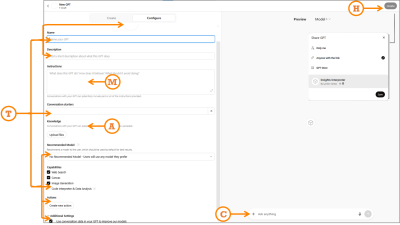
M: Map your prompt
Paste your full WIRE+FRAME prompt into the Instructions section exactly as written. As a reminder, we have included the breakdown and excerpts from the previous detailed prompt:
- Who and what: The AI persona and main output: “…a senior UX researcher and customer insights analyst… specializes in synthesizing qualitative data from multiple sources…”.
- Input context: Background or data scope to frame the task: “…analyzing customer feedback uploaded from sources such as…”.
- Rules and constraints: Boundaries: “…do not invent pain points, representative quotes, journey stages, or patterns…”.
- Expected output: Output format and fields: “…a structured list of themes. For each theme include…”.
- Flow: Clear, ordered tasks: “Recommended task flow: Step 1…”.
- Reference voice: Tone, mood, or example: “…concise, pattern-based, and objective…”.
- Ask for clarification: Ask questions if something is unclear: “…if data is missing or unclear, ask before continuing…”.
- Memory: Memory for retaining earlier definitions: “Unless explicitly instructed otherwise, continue using this process…”.
- Evaluate and iterate: Allow the AI to evaluate its own output: “…critically evaluate… suggest improvements…”.
If you are creating Copilot Agents or Gemini Gems instead of a CustomGPT, you still paste your WIRE+FRAME prompt into the relevant Instructions sections.
A: Add knowledge and training
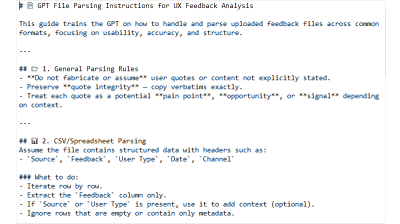
In the Knowledge section, upload up to 20 clearly labeled files that help the CustomGPT answer effectively. Files should be small and versioned: feedback_2025_Q2.csv is better than latestfile_final2.csv. For this prompt, which is designed to analyze customer feedback, generate themes by customer journey, and score them by severity and effort, files could include:
- A theme taxonomy;
- Instructions for analyzing uploaded data;
- Examples of real UX research reports using this structure;
- Severity and effort scoring guidelines, such as what makes something a 3 rather than a 5 in severity;
- Customer journey map stages;
- Customer feedback file templates, not actual data.
An example of a file that helps analyze uploaded data is shown below:
T: Tailor it to the audience
Audience tailoring
If you are building this for others, your prompt should have defined the tone in the “Reference voice” section. If it did not, do it now so the CustomGPT is tailored to the tone and expertise level of the users who will use it. Also use the Conversation starters section to add a few examples or common requests that help users get started with the CustomGPT, again written for your users. For example, for our Insight Interpreter we could use “Analyze feedback from the attached file” to make it clearer for anyone, instead of “Analyze data,” which might be fine if you were using it alone. In our Designerly Curiosity GPT, assuming users may not know what it can do, we use prompts like “What are the types of curiosity?” and “Give me a micro-practice to spark curiosity.”
Functional tailoring
Fill in the CustomGPT name, icon, description, and capabilities.
- Name: Choose one that clearly shows what the CustomGPT does. Let’s use “Insight Interpreter — Customer Feedback Analyzer.” If needed, you can also add a version number. This name will appear in the sidebar when people use or pin it, so the first part should be memorable and easy to recognize.
- Icon: Upload an image or generate a new one. Keep it simple so it is easy to recognize at a smaller size when people pin it in their sidebar.
- Description: A short but clear description of what the CustomGPT can do. If you plan to list it in the GPT Store, this helps people decide whether to choose yours or a similar one.
- Recommended model: If your CustomGPT requires certain model capabilities, such as GPT-5 thinking for detailed analysis, select it. In most cases you can safely leave this to the user’s choice or select the most common model.
- Capabilities: Turn off anything you will not need. We will turn off Web Search so the CustomGPT can focus only on uploaded data instead of expanding into the internet, and we will turn on Code Interpreter & Data Analysis so it can understand and process uploaded files. Canvas lets users work in a shared canvas with the GPT for editing writing tasks; Image generation is for cases where the CustomGPT needs to create images.
- Actions: Gives the CustomGPT access to third-party APIs — advanced functionality that we do not need.
- Additional settings: Cleverly hidden and enabled by default — we opt out of allowing OpenAI models to learn from our data.
C: Check, test, and refine
Do one final visual check to make sure you have filled in all applicable fields and that the basics are in place: is the concept accurate and clear, not a “do everything” bot? Are the roles, goals, and tone clear? Do we have the right assets — documents and guides — to support it? Is the flow simple enough for others to start easily? Once these boxes are checked, move on to testing.
Use the Preview panel to check whether your CustomGPT works as well as, or maybe even better than, your original WIRE+FRAME prompt, and whether it fits your intended audience. Try several typical inputs and compare the outputs with what you expected. If something worked before but now does not, check whether new instructions or knowledge files are overriding earlier ones.
When things feel off, here are quick debugging fixes:
- Generic answers? Tighten the Input context or update the knowledge files.
- Hallucinations? Review your Rules section. Turn off web browsing if external data is not needed.
- Wrong tone? Strengthen the Reference voice or replace it with clearer examples.
- Inconsistent? Test different models in the preview window and set the most reliable one as “Recommended.”
H: Hand off and maintain
When your CustomGPT is ready, you can publish it through the “Create” option. Choose the right access option:
- Only me: For personal use. Great if you are still experimenting or keeping it for yourself.
- Anyone with the link: Exactly what it sounds like. Shareable but not searchable. Great for pilots with a team or small group. Just remember that links can be shared further, so treat them as semi-public.
- GPT Store: Fully public. Your assistant is listed and discoverable to anyone browsing the store. This is the option we will use.
- Business workspace — if you use GPT Business: Share only with other users in your business account. This is the easiest way to keep it internal and controlled.
But handoff does not end when you click “publish.” You should maintain it so it remains relevant and useful:
- Collect feedback: Ask team members what worked, what did not, and what they had to fix manually.
- Iterate: Apply changes directly or duplicate the GPT if you want multiple versions. You can find all your CustomGPTs here: https://chatgpt.com/gpts/mine
- Track changes: Keep a simple changelog — date, version, updates — for traceability.
- Update knowledge: Refresh knowledge files and examples regularly so responses do not become outdated.
And that is it! Our Insight Interpreter is now live!
Because we used the WIRE+FRAME prompt from the previous article to build the Insight Interpreter CustomGPT, we compared the results:
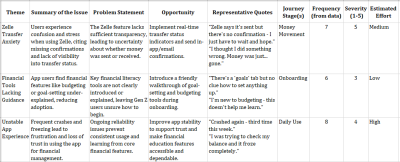
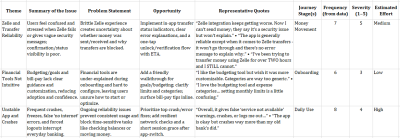
The results are similar, with small differences, and that is expected. If you compare the outputs closely, the themes, issues, journey stages, frequency, severity, and estimated effort align, with some differences in wording for the theme, issue summary, and issue framing. Opportunities and quotes have more visible differences. This is mostly due to the CustomGPT’s knowledge and training files, including instructions, examples, and constraints, which now act as persistent guidance.
Remember that in reality, generative AI is generative by nature, so outputs will vary. Even with the same data, you will not get identical wording every time. Also, underlying models and their capabilities change quickly. If you want to maintain as much consistency as possible, recommend a model — although people can change it — track your data versions, and compare structure, priorities, and evidence rather than exact wording.
While we would love you to use Insight Interpreter, we strongly recommend spending 15 minutes, following the steps above, and building your own. It will be exactly what you or your team needs — including tone, context, and output formats — and you will get the AI assistant you actually need.
Inspiration for other AI assistants
We just built Insight Interpreter and mentioned two contenders: Critique Coach and Prototype Prodigy. Here are a few other realistic use cases that may spark ideas for your own AI assistant:
- Workshop Wizard: Generates workshop agendas, creates icebreaker questions, and drafts survey questions.
- Research Recap Buddy: Summarizes raw transcripts into key themes, then creates highlight reels — quotes plus visuals — for team presentations.
- Persona Refresher: Updates outdated personas with the latest customer feedback, then rewrites them in different tones — formal for leadership vs. casual for the design team.
- Content Checker: Checks copy for tone, accessibility, and reading level before it reaches your website.
- Trend Tamer: Scans competitor reviews and identifies emerging patterns you can respond to before they hit your roadmap.
- Microcopy Provocateur: Tests alternative copy variants by injecting different tones — cheeky, calm, ironic, patronizing — and role-playing how users may respond. Especially useful for error states or calls to action.
- Ethical UX Debater: Challenges your design decisions and deceptive patterns by simulating the voice of an ethics board or concerned user.
The best AI assistants come from carefully examining your workflow and looking for areas where AI can regularly and repeatedly augment your work. Then follow the steps above to create a team of custom AI assistants.
Ask me anything about assistants
What are the limitations of CustomGPTs?
Right now, the best AI analogy is a very smart intern with access to a lot of information. CustomGPTs still run on LLMs, which are essentially trained on massive amounts of information and programmed to generate responses predictably based on that data, including possible bias, misinformation, or incomplete information. With that in mind, you can make that intern provide better and more relevant outputs by using your uploaded files as onboarding documents, your constraints as a job description, and updates as retraining.
Can I copy someone else’s public CustomGPT and improve it?
Not directly, but if another CustomGPT inspires you, you can look at how it behaves and build your own using WIRE+FRAME and MATCH. That way you make it yours and have full control over instructions, files, and updates. However, you can do this with Google’s equivalent — Gemini Gems. Shared Gems behave similarly to shared Google Docs, so once shared, any user with access to the Gem can view all your uploaded instructions and files. Any user with edit access to the Gem can also update and delete the Gem.
How private are my uploaded files?
Your uploaded files are stored and used to answer requests to your CustomGPT. If your CustomGPT is not private or you have not disabled the hidden setting that allows CustomGPT conversations to improve the model, that data may be used. Do not upload sensitive, confidential, or personal data that you would not want circulating. Enterprise accounts have some safeguards, so check with your company.
How many files can I upload, and does size matter?
The limit differs by platform, but smaller, specific files generally work better than huge documents. Think “chapter,” not “whole book.” At the time of publication, CustomGPT allows up to 20 uploaded files, Copilot Agents up to 200 — if you need anywhere close to that, your agent is probably not focused enough — and Gemini Gems up to 10.
What is the difference between a CustomGPT and a Project?
A CustomGPT is a focused assistant, like an intern trained to perform one role well, such as Insight Interpreter. A Project is more like a workspace where you can group multiple prompts, files, and conversations around a broader goal. CustomGPTs are specialists. Projects are containers. If you want something reusable, shareable, and role-specific, choose a CustomGPT. If you want to organize broader work with multiple tools and outputs plus shared knowledge, Projects are a better fit.
From reading to building
In this AI x Design series, we moved from messy prompts — “A Week In The Life Of An AI-Augmented Designer” — to the structured WIRE+FRAME prompting framework — “Prompting Is A Design Act.” And now, in this article, to your own reusable AI helper.
CustomGPTs do not replace designers; they extend them. The real magic is not in the tool itself, but in how you design and manage it. You can use public CustomGPTs for inspiration, but the ones that truly fit your workflow are the ones you design yourself. They extend your craft, codify your expertise, and give your team leverage that generic AI models cannot provide.
Build one this week. Better yet, today. Train it, share it, test it, and refine it into an AI assistant that can augment your team.



.webp)
.webp)
.webp)
.webp)
.webp)