
While talking with DebugBear representative Matt Zeunert, he casually mentioned something called “Tight” mode while describing how browsers fetch and prioritize resources. We wanted to nod along as if we knew exactly what he was talking about, but eventually had to ask: What on earth is “Tight” mode?
We received two artifacts, one of which is this video where Akamai web performance expert Robin Marx speaks at the “We Love Speed” event in France a few weeks ago:
The other artifact is a Google document originally published in 2015 by Patrick Meenan, but updated relatively recently, in November 2023. Patrick’s blog has been inactive since 2014, so we will simply leave you the link to the Google document for review.
That is everything we have and everything we could find online about this thing called “Tight” mode, which appears to have so much influence on how the web works. Robin acknowledged the lack of information in his talk, and the amount of personal research presented there is worth noting and mentioning, because it attempts to describe and illustrate how different browsers fetch different resources with different priorities. Given the lack of material on the topic, we decided to share what we were able to understand from Robin’s research and Patrick’s updated article.
It is the first of two phases
The fact that Patrick’s original publication date is 2015 makes it unsurprising that we are talking about something that is now roughly 10 years old. The 2023 update is already fairly old in “web years,” yet we still cannot find “Tight” mode anywhere when searching for it.
So how do we define “Tight” mode? Here is how Patrick explains it:
“Chrome loads resources in 2 phases. Tight mode is the initial phase and limits loading of lower-priority resources until the<body>is attached to the document, basically after all blocking scripts in the<head>have executed.”
— Patrick Meenan
So we have this two-part process that Chrome uses to fetch resources from the network, and the first part focuses on everything that is not a “lower-priority resource.” We have ways to tell browsers which resources we think are low priority, such as the Fetch Priority API and lazy-loading techniques that asynchronously load resources as they enter the viewport while scrolling — all of which Robin discusses in his presentation. But “Tight” mode has its own way of deciding which resources to load first.
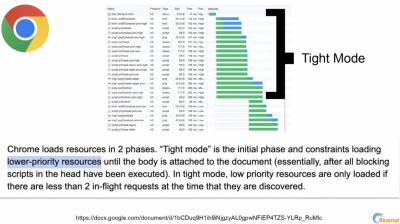
“Tight” mode discriminates between resources by taking everything marked as high and medium priority. Everything else is restricted and left waiting until the <body> is firmly attached to the document, signaling that blocking scripts have executed. That is when resources marked as low priority are allowed through the door during the second loading phase.
There is a big caveat, but we will get to it. The important thing to note is that…
Chrome and Safari apply “Tight” mode
Yes, both Chrome and Safari have some form of “Tight” mode running in the background. The previous image illustrates Chrome’s “Tight” mode. Now let’s look at Safari and compare the two.
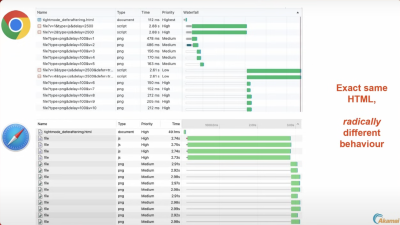
Look at that! Safari discriminates against high-priority resources during the initial fetch, just like Chrome, but we get very different loading behavior between the two browsers. Notice how Safari appears to exclude the first five PNG images marked with medium priority, while Chrome allows them. In other words, Safari forces all medium- and low-priority resources to wait in line until all high-priority items have finished loading, even though we are working with the exact same HTML. You could say Safari’s behavior is the most logical, since in the last image you can see that Chrome appears to exclude some high-priority resources from “Tight” mode. Clearly, something strange is happening there, and we will get to that later.
And where is Firefox in all of this? It does not apply any additional tightening measures when evaluating resource priority on the page. We could think of this as the “classic” waterfall approach to fetching and loading resources.

Chrome and Safari activate “Tight” mode differently
Robin makes this very clear in his talk. Chrome and Safari are both supporters of “Tight” mode, but they activate it under different circumstances, which we can describe like this:
Notice that Chrome only looks at the document’s <head> when determining resource priorities, and only when JavaScript is involved. Safari, meanwhile, looks at both JavaScript and CSS, and at any place where those things may appear in the document — whether in the <head> or the <body>. This helps explain why Chrome excludes images marked as high priority in Figure 2 from its “Tight” mode implementation — in this context, it only cares about JavaScript.
So even if Chrome detects a script file in the document’s <body> with fetchpriority="high", the file is not treated as “high” priority and will be loaded after everything else. Safari, meanwhile, respects fetchpriority anywhere in the document. This helps explain why, in Figure 2, Chrome leaves two scripts behind while Safari appears to load them during “Tight” mode.
That does not mean Safari does not do anything strange in its process. Given this markup:
<head>
  <script src="script-1.js"></script>
  <script src="script-1.js"></script>

  <script src="script-3.js" defer></script>
  <script src="script-4.js" defer></script>
</head>
<body>
  <img src="image-1.jpg">
  <img src="image-2.jpg">
  <img src="image-3.jpg">
  <img src="image-4.jpg">
  <img src="image-5.jpg">
</body>
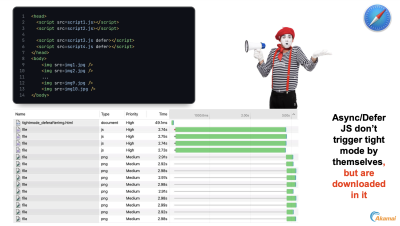
…you might expect Safari to delay loading the two low-priority scripts in the <head> until the five images in the <body> have downloaded. But it does not. Instead, Safari loads those two scripts during its version of “Tight” mode.
Chrome and Safari exceptions
Earlier, we mentioned that low-priority resources are loaded during the second loading phase, after “Tight” mode ends. But we also mentioned that there is a big caveat. Now let’s talk about that.
According to Patrick’s article, we know that “Tight” mode is “the initial phase and limits loading of lower-priority resources until the <body> is attached to the document, basically after all blocking scripts in the <head> have executed.” But there is a second part of that definition that we skipped:
“In Tight mode, low-priority resources are only loaded if there are fewer than two requests in flight at the time they are discovered.”
A-ha! So there is a way for low-priority resources to load during “Tight” mode. It happens when fewer than two “in-flight” requests are running at the moment of discovery.
Wait — what does “in-flight” even mean?
It means that fewer than two high- or medium-priority items are being requested. Robin demonstrates this by comparing Chrome with Safari under the same conditions, where there are only two high-priority scripts and ten normal images:
<head>
  <script src="script-1.js"></script>
  <script src="script-1.js"></script>
</head>
<body>
  <img src="image-1.jpg">
  <img src="image-2.jpg">
  <img src="image-3.jpg">
  <img src="image-4.jpg">
  <img src="image-5.jpg">
  <img src="image-10.jpg">
</body>
First, let’s look at what Safari does, because it is the simplest method:

Nothing complicated, right? Two high-priority scripts are downloaded first, and the 10 images follow immediately after. Now let’s look at Chrome:
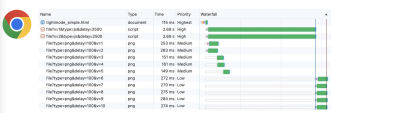
We have two high-priority scripts loaded first, as expected. But then Chrome decides to let the first five medium-priority images in, and then excludes the final five low-priority images. What. The. Heck.
The reason is noble: Chrome wants to load the first five images because, presumably, the Largest Contentful Paint (LCP) will often be one of those images, and Chrome is betting that the web will be faster overall if it handles some of that logic automatically. Again, that is a noble argument, even if it will not be 100% accurate. But it muddies the waters and makes “Tight” mode harder to understand when we see medium- and low-priority items treated like high-priority citizens.
Making things even more confusing, Chrome appears to accept only up to two medium-priority resources in this discriminating process. The rest are marked as low priority.
That is what we mean by “fewer than two in-flight requests.” If Chrome sees only one or two items entering “Tight” mode, then it automatically prioritizes up to the first five non-critical images as an LCP optimization effort.
Safari actually does something similar, but in a different context. Instead of accepting low-priority items when there are fewer than two in-flight requests, Safari accepts both medium- and low-priority items into “Tight” mode from anywhere in the document, regardless of whether they are in the <head>. The exception is any async or deferred script, because, as we saw earlier, those are still loaded immediately.
How can you manipulate “Tight” mode?
This could be a great topic for a follow-up, but here we will point you directly to Robin’s video, because his personal research is worth consuming directly. But here is the gist:
We have these high-level features that can help influence priority, including resource hints (that is, preload and preconnect), the Fetch Priority API, and lazy-loading techniques.
We can set fetchpriority="high" and fetchpriority="low" on elements.
<img src="lcp-image.jpg" fetchpriority="high">
<link rel="preload" href="defer.js" as="script" fetchpriority="low">
Using fetchpriority="high", we can pull elements located lower in the source code into “Tight” mode. Using fetchpriority="low", we can remove elements located higher in the source code from “Tight” mode.
- In Chrome, this works for images, async/deferred scripts, and scripts located at the end of the
<body>. - In Safari, this works only for images.
Again, watch Robin’s talk for the full story, starting from around the 28:32 mark.
So that is “Tight”... mode
It is hard to believe there is so little information about “Tight” mode floating around online. We would expect something like this to be well documented, surely on Chrome Developers or somewhere similar, but all we have is a lightweight Google document and an in-depth presentation that paints a picture of how two of the three major browsers fetch and prioritize resources. Let us know if you have additional information that you have published or found — we would be happy to include it in the discussion.


.webp)
.webp)
.webp)
.webp)
.webp)